Updated on September 26, 2026
You don't need to know finance. You answer questions about your business, the app builds the cash flow, calculates the indicators and tells you whether it makes sense: recommended, recommended with adjustments, or not recommended.
Contents
- Getting started: guided or advanced
- The guided assistant, step by step
- The advanced editor
- Reading the verdict and the indicators
- How fragile is it?
- The report in Excel and PDF
- Is this fair worth it?
- Saving and opening your projects
- Plans: Freemium and Premium
1. Getting started: guided or advanced
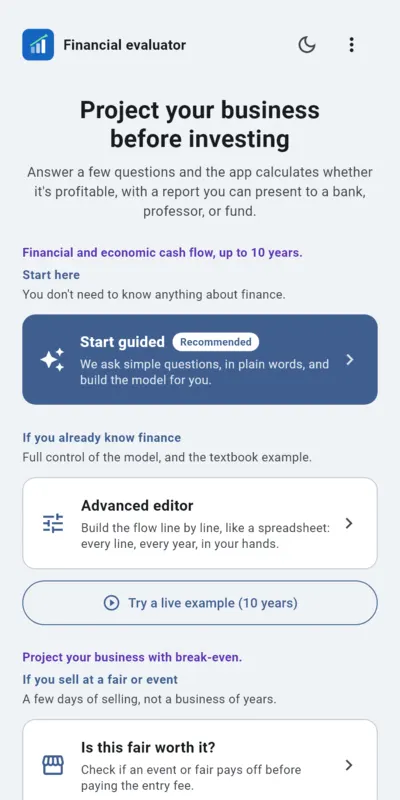
The app works in the browser (PC, Mac, iPhone or iPad) and on Android. When you open it you see four paths:
- Start guided: the app asks you simple questions and builds the model for you. Recommended for your first time.
- Advanced editor: you build the cash flow line by line, like a spreadsheet, with every year in view.
- Try a live example (10 years): opens example 14.2 from Sapag's textbook, with its exact figures, so you can see the app at work before entering your data.
- Is this fair worth it?: a separate module to assess an event lasting a few days (see chapter 7).
2. The guided assistant, step by step
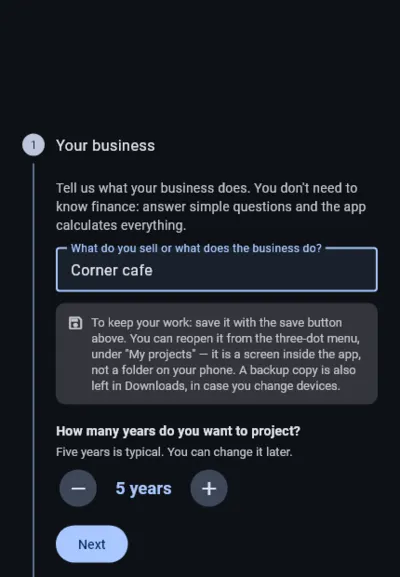
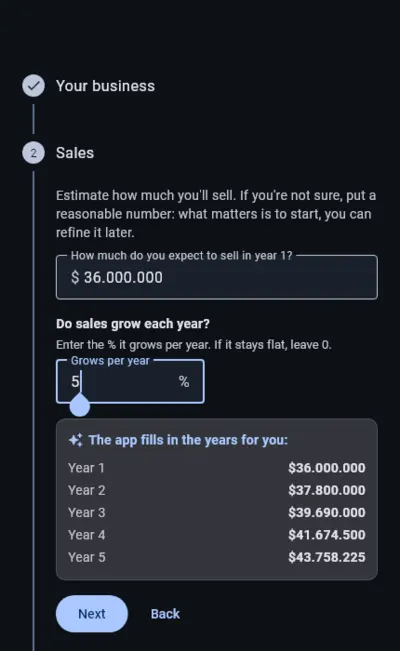
There are eight steps. You can go forward and back at any time; what you type is not lost.
- Your business: what you do and how many years you want to project (5 is typical).
- Sales: how much you expect to sell in year 1 and how much sales grow each year. The app fills in the following years for you.
- Cost of what you sell: as a percentage of sales or as a fixed amount per year.
- Fixed costs: rent, wages, utilities; one per line.
- Investments: equipment, machinery or fit-out, with their useful life. Depreciation is calculated for you.
- Money to start: working capital, the cash you need while the business gets going.
- What you require: the return you ask of the project and the income tax. The app starts from reference values you can change.
- Result: the verdict and the indicators.
From the result you can tap Open in advanced mode to continue in the editor with everything you built.
3. The advanced editor
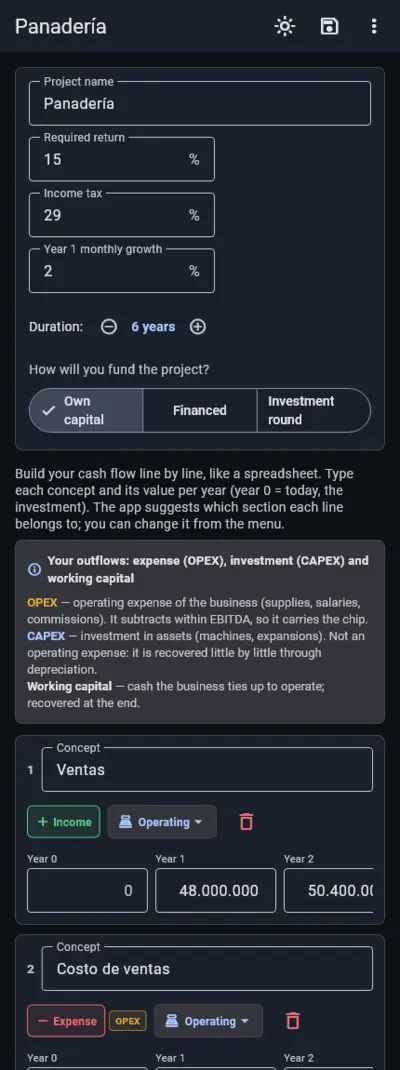
Here the cash flow is built from lines: each one has a name and a value per year. You type amounts as positive numbers; the app suggests the section (operating, depreciation, interest or cash adjustment) and the sign from the name, and you confirm it.
- Add line adds a row. A purchase in year 3 or a wage increase from year 2 is typed in its year.
- At the top you set the duration (2 to 10 years), the required return, the income tax and the monthly growth in year 1.
- You choose how it is funded: own capital, financed (with a French or German amortization loan, from Add loan) or investment round.
- The ⋮ menu includes, among others, Load template, No debt vs. with debt, Discount rate by periods and the Sapag example.
4. Reading the verdict and the indicators
The verdict comes from fixed, explainable rules, not from an opinion:
- NPV (net present value): what the project adds above the return you require, in today's money. Positive is good.
- IRR (internal rate of return): the project's annual return. It makes sense if it beats the return you require.
- ROI: how much comes back for each unit invested, over the whole horizon.
- Payback: how many years it takes to recover the investment by operating. It does not count selling the business at the end.
Below comes the report: the NPV in plain words, whether it earns what you ask, how long it takes to recover the investment and what you could adjust.
5. How fragile is it?
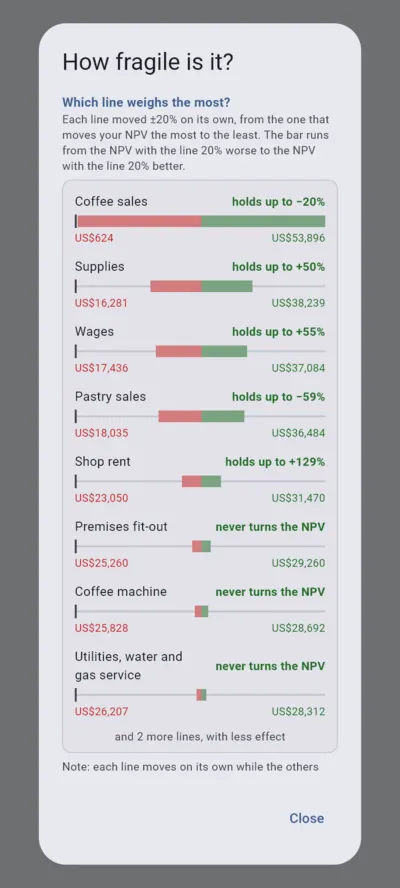
The question every professor or bank asks: what if something turns out worse? The app answers with a sentence, for example "It holds up to 15% less sales", and with a detail, part of Premium, that shows:
- Which line weighs the most: it moves every income, cost and investment one at a time, by how much it can vary, and ranks them from the one that moves your NPV the most to the least, with the point where each one turns it negative. Every line starts at medium uncertainty (±20%) and you can set it to low (±10%, a signed contract) or high (±30%, a new price): that way the order shows the riskiest lines, not just the biggest. If a line's range can turn the NPV negative, the app marks it in red.
- The combined bad case: what happens if the three lines that weigh the most get worse at the same time, each one by its own uncertainty.
- A table of 25 scenarios crossing sales with the required return.
6. The report in Excel and PDF
The project is delivered in two files made from what you built in the app. Downloading them is part of Premium (see chapter 9).
- PDF: the dashboard with the verdict, the indicators and the charts, the cash flow and the full report. Ready to present.
- Excel with live formulas: every calculated figure carries its formula, so you can see where it comes from. Figures in blue are your data; the black ones are calculated by the sheet. If you change a blue figure, for example the sales growth rate, everything recalculates: EBITDA, tax, cash flow, NPV and IRR.
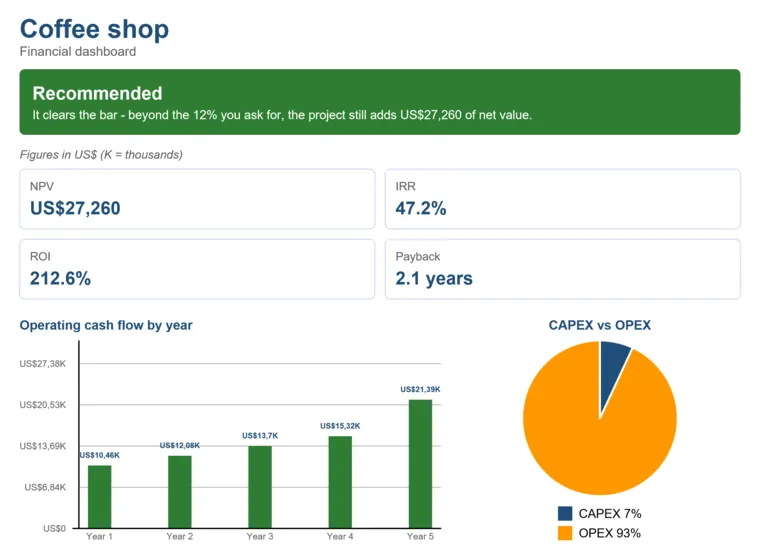
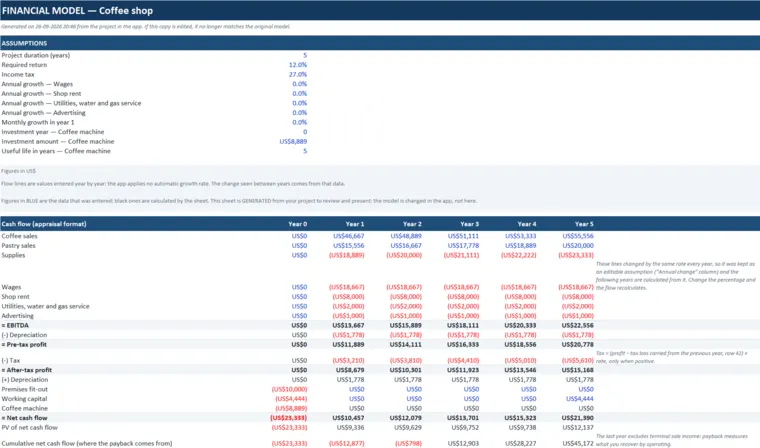
The spreadsheet also includes the CAPEX vs OPEX sheet, which compares what you invest once with what it costs to operate every year, and the Report sheet. The Excel file opens with Excel or Google Sheets, and the PDF with any PDF reader. The model is changed in the app: the spreadsheet is for reviewing and presenting.
7. Is this fair worth it?
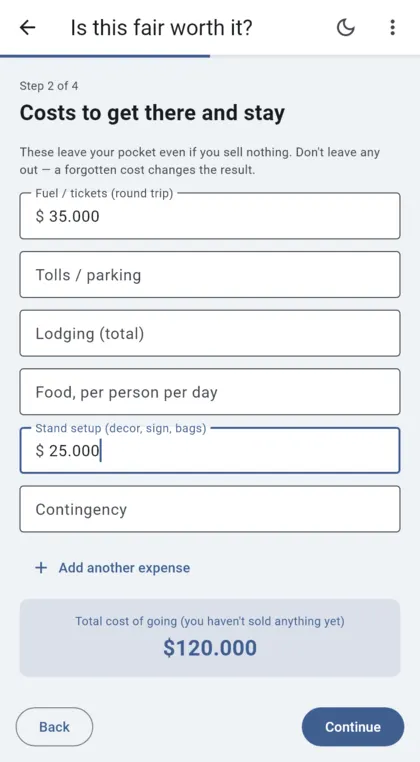
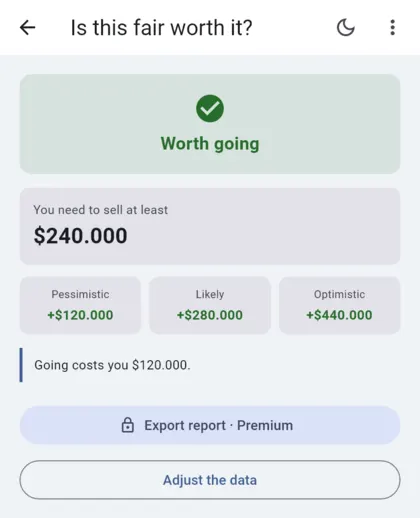
For an event lasting a few days the NPV is not the right tool: the break-even point is. There are four steps: The event and who goes, Costs to get there and stay, Your sales and Your time (optional).
- The costs of going (entry fee, travel, lodging, food, setup) leave your pocket even if you sell nothing, so leave none of them out.
- What you don't sell is not a loss: it is stock that comes back with you.
- The result tells you the least you need to sell and shows three scenarios: pessimistic, likely and optimistic. Exporting that report is part of Premium.
8. Saving and opening your projects
The app does not ask for an account: your projects are saved on your device.
- The save button at the top saves the project. You open it again from the ⋮ menu, under My projects.
- To move it to another device or back it up: ⋮ menu → Save project to a file (.json). On the other device, Open a saved project: open the file with any text app, copy everything and paste it.
9. Plans: Freemium and Premium
With the Freemium plan you build your full model, with as many lines as you need, save as many projects as you want, and see the verdict and the indicators on screen. It includes the three financing modes, the first section of the report, the headline of how fragile your project is and the fair result.
Premium adds the year-by-year cash flow table, the download of the Excel file with formulas and of the PDF, the full report on screen, the full cash flow (all 12 months of year 1 and every year) and the fragility analysis in detail.
- On Android: CLP 6,500 per month or CLP 32,000 per year, from Google Play.
- In the browser: a 30-day pass for CLP 6,500 or a 365-day pass for CLP 32,000, paid with Flow. It is not a subscription: when it ends you go back to the Freemium plan and nothing else is charged. You can also buy a single Report with formulas for CLP 3,600.
The full conditions are in the terms of service (in Spanish).
Questions, or something not working? Write to evaluadorfinanciero@seguralert.cl.